> ## Documentation Index
> Fetch the complete documentation index at: https://docs-staging-ia-user-profiles.mintlify.site/llms.txt
> Use this file to discover all available pages before exploring further.

> Learn how to configure an update policy form using Forms for Actions for users to review and accept new terms of service or consent updates.

# Use Cases: Configure an update policy form using Forms

<Card title="Before you start">
  1. Create a [Machine-to-Machine Application](/docs/get-started/auth0-overview/create-applications/machine-to-machine-apps) with the following scopes enabled:

  * `read:users`
  * `update:users`
  * `create:users`
  * `read:users_app_metadata`
  * `update:users_app_metadata`
  * `create:users_app_metadata`

  2. Add a [Vault connection](/docs/customize/forms/vault) using the M2M application credentials.
</Card>

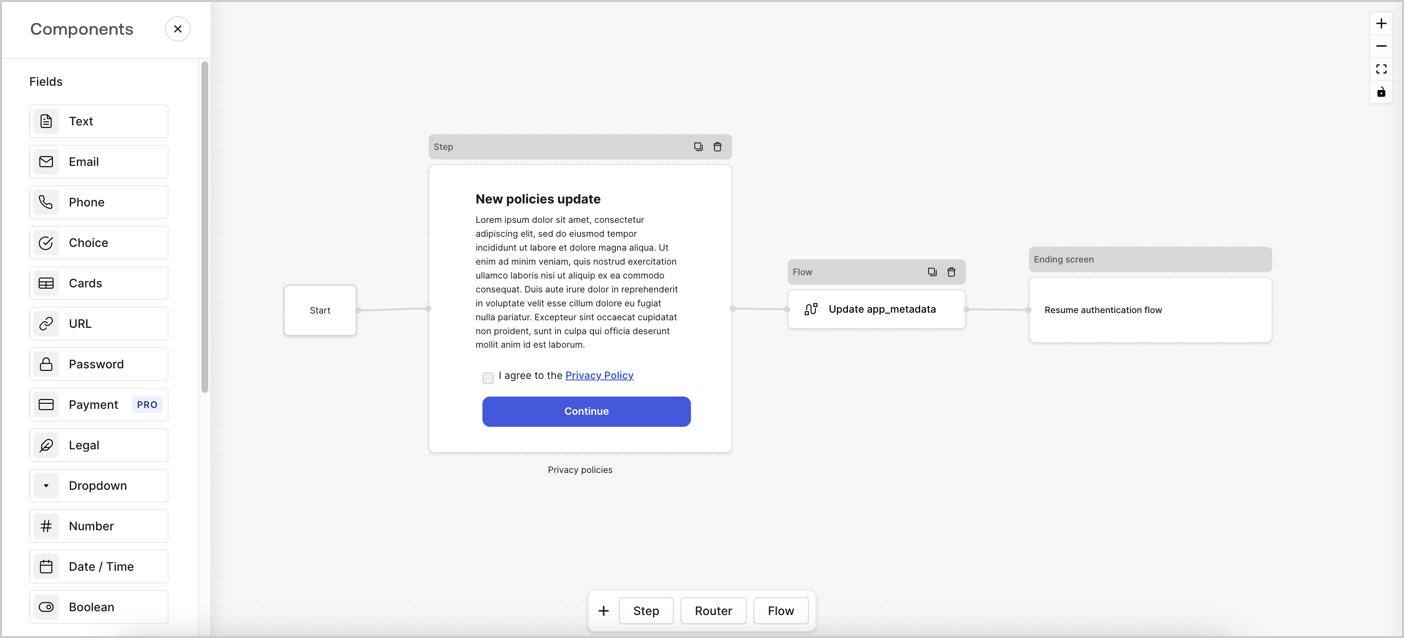
Forms for Actions allows you to create custom privacy policies flows and store the consent under the `app_metadata` object.
<Frame>
  <img src="https://mintcdn.com/docs-staging-ia-user-profiles/S112P5RevZ3Funsb/docs/images/cdy7uua7fh8z/6i68dMvHDTijfRmSgN1x8Q/ad900e7d4c0fb34645921435472b8684/privavy-policy-form.png?fit=max&auto=format&n=S112P5RevZ3Funsb&q=85&s=e29a6b8705744f10f02910387676c3b9" alt="Dashboard > Actions > Forms > Privacy policy use case" data-og-width="1404" width="1404" data-og-height="638" height="638" data-path="docs/images/cdy7uua7fh8z/6i68dMvHDTijfRmSgN1x8Q/ad900e7d4c0fb34645921435472b8684/privavy-policy-form.png" data-optimize="true" data-opv="3" srcset="https://mintcdn.com/docs-staging-ia-user-profiles/S112P5RevZ3Funsb/docs/images/cdy7uua7fh8z/6i68dMvHDTijfRmSgN1x8Q/ad900e7d4c0fb34645921435472b8684/privavy-policy-form.png?w=280&fit=max&auto=format&n=S112P5RevZ3Funsb&q=85&s=0ce586b905c70d7b71f359e3a12fb363 280w, https://mintcdn.com/docs-staging-ia-user-profiles/S112P5RevZ3Funsb/docs/images/cdy7uua7fh8z/6i68dMvHDTijfRmSgN1x8Q/ad900e7d4c0fb34645921435472b8684/privavy-policy-form.png?w=560&fit=max&auto=format&n=S112P5RevZ3Funsb&q=85&s=1b7dcbc2cba19e758e1cdde47f9a00e5 560w, https://mintcdn.com/docs-staging-ia-user-profiles/S112P5RevZ3Funsb/docs/images/cdy7uua7fh8z/6i68dMvHDTijfRmSgN1x8Q/ad900e7d4c0fb34645921435472b8684/privavy-policy-form.png?w=840&fit=max&auto=format&n=S112P5RevZ3Funsb&q=85&s=886ec02eae8c7c04ddf3628a6714986d 840w, https://mintcdn.com/docs-staging-ia-user-profiles/S112P5RevZ3Funsb/docs/images/cdy7uua7fh8z/6i68dMvHDTijfRmSgN1x8Q/ad900e7d4c0fb34645921435472b8684/privavy-policy-form.png?w=1100&fit=max&auto=format&n=S112P5RevZ3Funsb&q=85&s=e761395735ea0fa494e0bfedcfebc1ca 1100w, https://mintcdn.com/docs-staging-ia-user-profiles/S112P5RevZ3Funsb/docs/images/cdy7uua7fh8z/6i68dMvHDTijfRmSgN1x8Q/ad900e7d4c0fb34645921435472b8684/privavy-policy-form.png?w=1650&fit=max&auto=format&n=S112P5RevZ3Funsb&q=85&s=bb09edd02172f27ba9c5d46f9a7f2676 1650w, https://mintcdn.com/docs-staging-ia-user-profiles/S112P5RevZ3Funsb/docs/images/cdy7uua7fh8z/6i68dMvHDTijfRmSgN1x8Q/ad900e7d4c0fb34645921435472b8684/privavy-policy-form.png?w=2500&fit=max&auto=format&n=S112P5RevZ3Funsb&q=85&s=314a48f9842096dbd5a12872ae9d2438 2500w" />
</Frame>

The sections below outline how you can create an Update Policy form using nodes and flows, along with steps for adding your form to a [Post Login](/docs/customize/actions/explore-triggers/signup-and-login-triggers/login-trigger) Action.

## Create a form from scratch

Follow these steps to create a form to gather information:

1. Open the Form editor by selecting **Auth0 Dashboard > Actions > Forms.**
2. Select **Create Form** > **Start from scratch**.

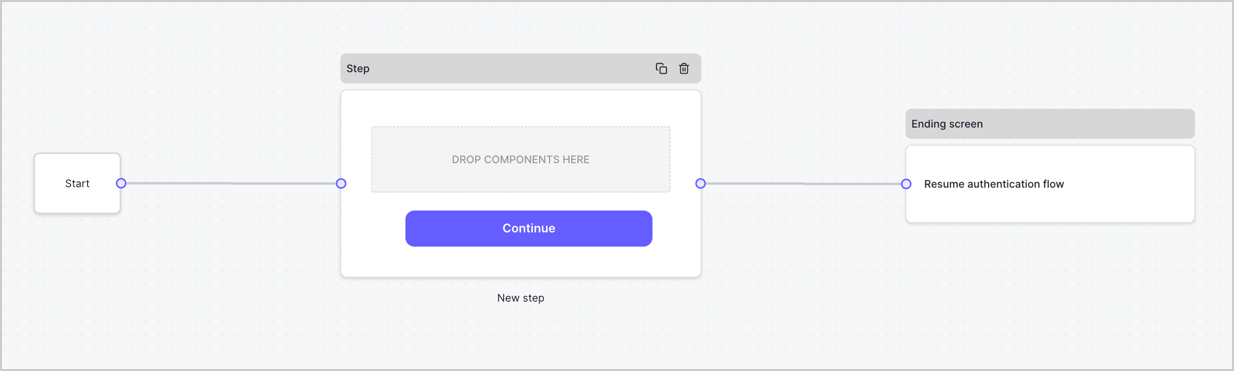
By default, a new form contains a Start node, a Step node, and an Ending screen node.
<Frame>
  <img src="https://mintcdn.com/docs-staging-ia-user-profiles/H5B3Zn_INb7eKK16/docs/images/cdy7uua7fh8z/2TZ9jSjgEcARFpULI6hz4R/a4319a1bd482f2ee5cc23100fdb2f42c/New-form-Forms-for-action-use-case.png?fit=max&auto=format&n=H5B3Zn_INb7eKK16&q=85&s=3842cf8910d30d2b7bb25312e64135c6" alt="Dashboard > Forms > Use Cases > Form" data-og-width="1234" width="1234" data-og-height="371" height="371" data-path="docs/images/cdy7uua7fh8z/2TZ9jSjgEcARFpULI6hz4R/a4319a1bd482f2ee5cc23100fdb2f42c/New-form-Forms-for-action-use-case.png" data-optimize="true" data-opv="3" srcset="https://mintcdn.com/docs-staging-ia-user-profiles/H5B3Zn_INb7eKK16/docs/images/cdy7uua7fh8z/2TZ9jSjgEcARFpULI6hz4R/a4319a1bd482f2ee5cc23100fdb2f42c/New-form-Forms-for-action-use-case.png?w=280&fit=max&auto=format&n=H5B3Zn_INb7eKK16&q=85&s=0416387237e636918ac7b2e944c260d4 280w, https://mintcdn.com/docs-staging-ia-user-profiles/H5B3Zn_INb7eKK16/docs/images/cdy7uua7fh8z/2TZ9jSjgEcARFpULI6hz4R/a4319a1bd482f2ee5cc23100fdb2f42c/New-form-Forms-for-action-use-case.png?w=560&fit=max&auto=format&n=H5B3Zn_INb7eKK16&q=85&s=b90d8fb29fd29b6988f7a20f27493918 560w, https://mintcdn.com/docs-staging-ia-user-profiles/H5B3Zn_INb7eKK16/docs/images/cdy7uua7fh8z/2TZ9jSjgEcARFpULI6hz4R/a4319a1bd482f2ee5cc23100fdb2f42c/New-form-Forms-for-action-use-case.png?w=840&fit=max&auto=format&n=H5B3Zn_INb7eKK16&q=85&s=805ab2bf3a6d135a94ff7e616d297530 840w, https://mintcdn.com/docs-staging-ia-user-profiles/H5B3Zn_INb7eKK16/docs/images/cdy7uua7fh8z/2TZ9jSjgEcARFpULI6hz4R/a4319a1bd482f2ee5cc23100fdb2f42c/New-form-Forms-for-action-use-case.png?w=1100&fit=max&auto=format&n=H5B3Zn_INb7eKK16&q=85&s=f928b5751fa7b88258cdffbe95d7e325 1100w, https://mintcdn.com/docs-staging-ia-user-profiles/H5B3Zn_INb7eKK16/docs/images/cdy7uua7fh8z/2TZ9jSjgEcARFpULI6hz4R/a4319a1bd482f2ee5cc23100fdb2f42c/New-form-Forms-for-action-use-case.png?w=1650&fit=max&auto=format&n=H5B3Zn_INb7eKK16&q=85&s=bd0e70cee4ce85837287dc15a5b64a01 1650w, https://mintcdn.com/docs-staging-ia-user-profiles/H5B3Zn_INb7eKK16/docs/images/cdy7uua7fh8z/2TZ9jSjgEcARFpULI6hz4R/a4319a1bd482f2ee5cc23100fdb2f42c/New-form-Forms-for-action-use-case.png?w=2500&fit=max&auto=format&n=H5B3Zn_INb7eKK16&q=85&s=b6460241145629504bfb74d3f5331d53 2500w" />
</Frame>

### Configure the Step node

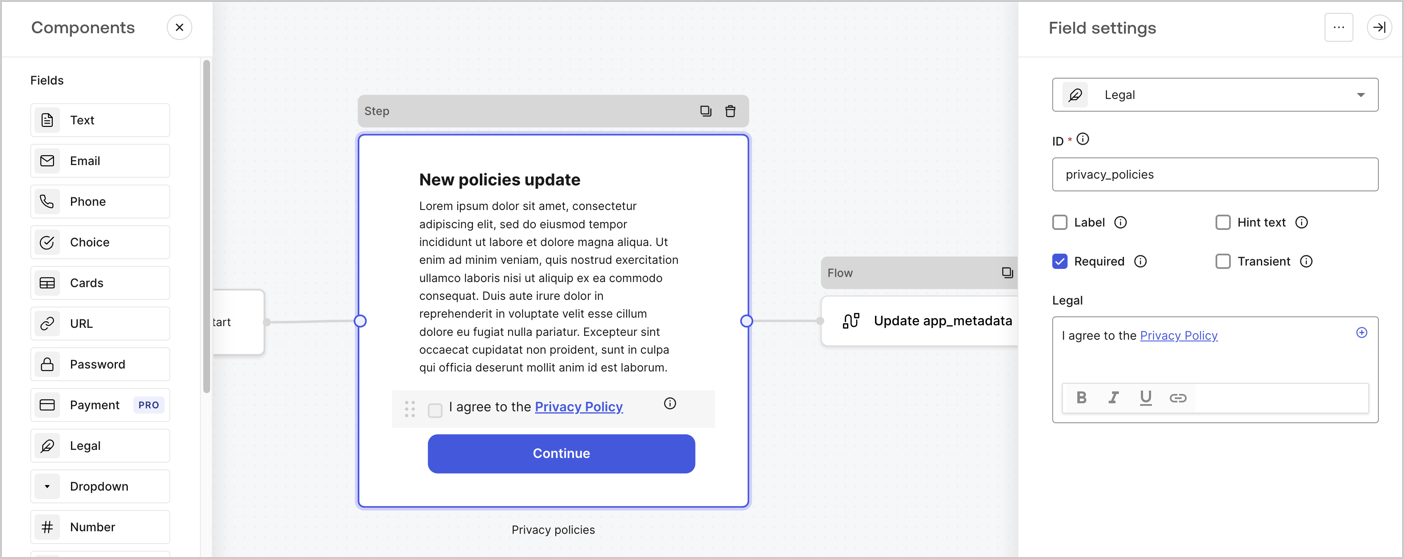
The Step node is the graphical interface visible to users. Add [Fields](/docs/customize/forms/nodes-and-components) to the Step node to collect the new agreement acceptance value by following these steps:

1. Drag a **Rich text** field from the **Components menu** into the **Step** node.

   * **Rich text**: Enter a description of your privacy policies updates.
   * Select **Save**.
2. Drag a **Legal** field into the **Step** node.

   * **ID**: Enter `privacy_policies`.
   * **Required**: Enable the checkbox.
   * **Legal**: Enter `I agree to the Privacy Policy`.
   * Select **Save**.
3. Select **Publish** to save.
<Frame>
  <img src="https://mintcdn.com/docs-staging-ia-user-profiles/rt8oCyZvmtS5ZNz7/docs/images/cdy7uua7fh8z/59zFFjQjAnjogkc2QGIqqJ/0ad66b1b636544122aa4e65968b76c2c/privacy-policy-step-node.png?fit=max&auto=format&n=rt8oCyZvmtS5ZNz7&q=85&s=130e09c4e0da1dbd37e12061061a82b5" alt="Dashboard > Actions > Forms > Use case privacy policy step node" data-og-width="1404" width="1404" data-og-height="559" height="559" data-path="docs/images/cdy7uua7fh8z/59zFFjQjAnjogkc2QGIqqJ/0ad66b1b636544122aa4e65968b76c2c/privacy-policy-step-node.png" data-optimize="true" data-opv="3" srcset="https://mintcdn.com/docs-staging-ia-user-profiles/rt8oCyZvmtS5ZNz7/docs/images/cdy7uua7fh8z/59zFFjQjAnjogkc2QGIqqJ/0ad66b1b636544122aa4e65968b76c2c/privacy-policy-step-node.png?w=280&fit=max&auto=format&n=rt8oCyZvmtS5ZNz7&q=85&s=f85070d2be4e3032bdf9392ebefd0d3e 280w, https://mintcdn.com/docs-staging-ia-user-profiles/rt8oCyZvmtS5ZNz7/docs/images/cdy7uua7fh8z/59zFFjQjAnjogkc2QGIqqJ/0ad66b1b636544122aa4e65968b76c2c/privacy-policy-step-node.png?w=560&fit=max&auto=format&n=rt8oCyZvmtS5ZNz7&q=85&s=14c912859b9cd1ede7f938f921f1a8ed 560w, https://mintcdn.com/docs-staging-ia-user-profiles/rt8oCyZvmtS5ZNz7/docs/images/cdy7uua7fh8z/59zFFjQjAnjogkc2QGIqqJ/0ad66b1b636544122aa4e65968b76c2c/privacy-policy-step-node.png?w=840&fit=max&auto=format&n=rt8oCyZvmtS5ZNz7&q=85&s=d224f7e084ffc5c5481d58869be911a1 840w, https://mintcdn.com/docs-staging-ia-user-profiles/rt8oCyZvmtS5ZNz7/docs/images/cdy7uua7fh8z/59zFFjQjAnjogkc2QGIqqJ/0ad66b1b636544122aa4e65968b76c2c/privacy-policy-step-node.png?w=1100&fit=max&auto=format&n=rt8oCyZvmtS5ZNz7&q=85&s=d2a348707dc601ce6ce2a8f69772d24a 1100w, https://mintcdn.com/docs-staging-ia-user-profiles/rt8oCyZvmtS5ZNz7/docs/images/cdy7uua7fh8z/59zFFjQjAnjogkc2QGIqqJ/0ad66b1b636544122aa4e65968b76c2c/privacy-policy-step-node.png?w=1650&fit=max&auto=format&n=rt8oCyZvmtS5ZNz7&q=85&s=d05b49c614d792cfed65209810f191d4 1650w, https://mintcdn.com/docs-staging-ia-user-profiles/rt8oCyZvmtS5ZNz7/docs/images/cdy7uua7fh8z/59zFFjQjAnjogkc2QGIqqJ/0ad66b1b636544122aa4e65968b76c2c/privacy-policy-step-node.png?w=2500&fit=max&auto=format&n=rt8oCyZvmtS5ZNz7&q=85&s=c844ebaf309bcb55b90ee4e589afcab7 2500w" />
</Frame>

### Configure the Flow node

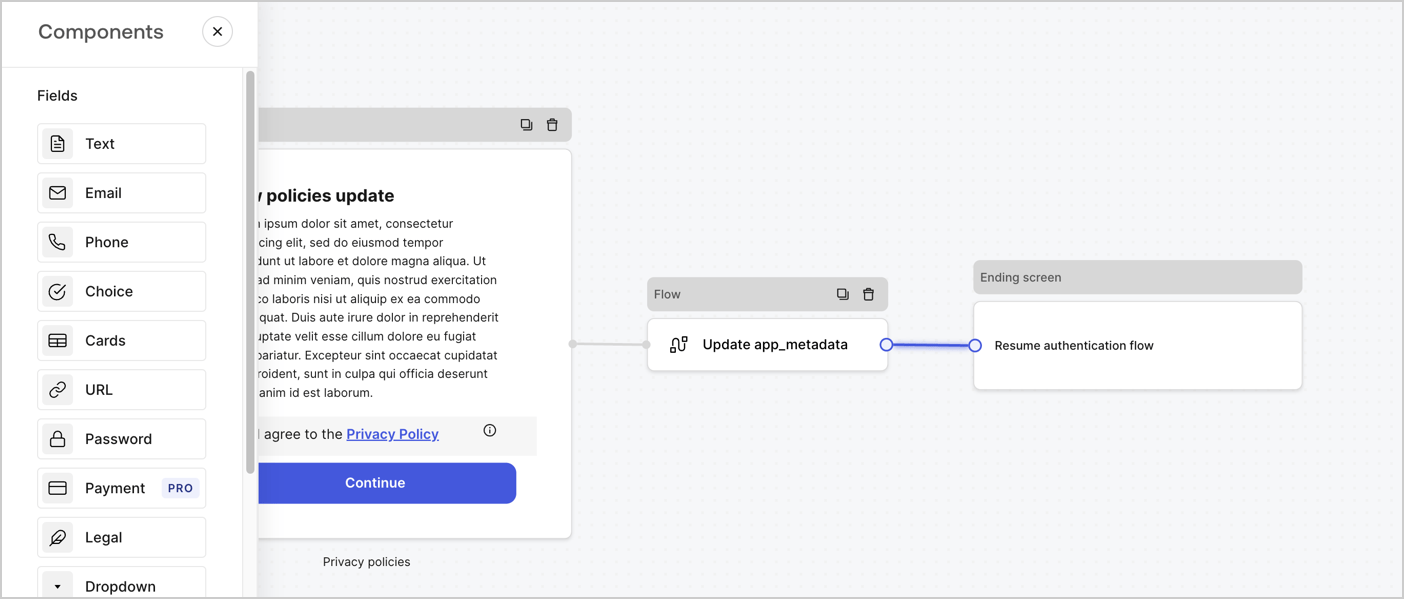
Add a **Flow** node after the **Step** node to update the `app_metadata` and resume the authentication flow by following these steps:

1. Select **Flow** from the bottom of the Form editor.
2. Remove the existing link between the **Step** and **Ending Screen** nodes.
3. Select the new **Flow** > **Click to add a flow** > **Create a new flow.**

   * Enter `Update app_metadata` in the **Name** field.
   * Select **Create**.
   * Select **Save**.
4. Link the **Flow** node to the **Step** and **Ending Screen** nodes as pictured below.
5. Select **Publish** to save.
<Frame>
  <img src="https://mintcdn.com/docs-staging-ia-user-profiles/S112P5RevZ3Funsb/docs/images/cdy7uua7fh8z/6YIkzm7SrpM9LW76AXuRzh/353c518fe82bbaa440836da1d83596d6/link-policies.png?fit=max&auto=format&n=S112P5RevZ3Funsb&q=85&s=a78ff2baa1a5aaf01499853d796f3175" alt="Dashboard > Actions > Forms > Form" data-og-width="1404" width="1404" data-og-height="599" height="599" data-path="docs/images/cdy7uua7fh8z/6YIkzm7SrpM9LW76AXuRzh/353c518fe82bbaa440836da1d83596d6/link-policies.png" data-optimize="true" data-opv="3" srcset="https://mintcdn.com/docs-staging-ia-user-profiles/S112P5RevZ3Funsb/docs/images/cdy7uua7fh8z/6YIkzm7SrpM9LW76AXuRzh/353c518fe82bbaa440836da1d83596d6/link-policies.png?w=280&fit=max&auto=format&n=S112P5RevZ3Funsb&q=85&s=c52144b2204cadd5149ecc03123d2bb6 280w, https://mintcdn.com/docs-staging-ia-user-profiles/S112P5RevZ3Funsb/docs/images/cdy7uua7fh8z/6YIkzm7SrpM9LW76AXuRzh/353c518fe82bbaa440836da1d83596d6/link-policies.png?w=560&fit=max&auto=format&n=S112P5RevZ3Funsb&q=85&s=d2eb097c49f93d4ea15e01403c16c299 560w, https://mintcdn.com/docs-staging-ia-user-profiles/S112P5RevZ3Funsb/docs/images/cdy7uua7fh8z/6YIkzm7SrpM9LW76AXuRzh/353c518fe82bbaa440836da1d83596d6/link-policies.png?w=840&fit=max&auto=format&n=S112P5RevZ3Funsb&q=85&s=c17da0a141966c5a745de69ecc847304 840w, https://mintcdn.com/docs-staging-ia-user-profiles/S112P5RevZ3Funsb/docs/images/cdy7uua7fh8z/6YIkzm7SrpM9LW76AXuRzh/353c518fe82bbaa440836da1d83596d6/link-policies.png?w=1100&fit=max&auto=format&n=S112P5RevZ3Funsb&q=85&s=62636c394ca876b9e8cab7b9daa5b054 1100w, https://mintcdn.com/docs-staging-ia-user-profiles/S112P5RevZ3Funsb/docs/images/cdy7uua7fh8z/6YIkzm7SrpM9LW76AXuRzh/353c518fe82bbaa440836da1d83596d6/link-policies.png?w=1650&fit=max&auto=format&n=S112P5RevZ3Funsb&q=85&s=b2dcbc5bddd8ebee73de399a9a8f69ca 1650w, https://mintcdn.com/docs-staging-ia-user-profiles/S112P5RevZ3Funsb/docs/images/cdy7uua7fh8z/6YIkzm7SrpM9LW76AXuRzh/353c518fe82bbaa440836da1d83596d6/link-policies.png?w=2500&fit=max&auto=format&n=S112P5RevZ3Funsb&q=85&s=9b71626fd8d82ce53294eecd0eca6973 2500w" />
</Frame>

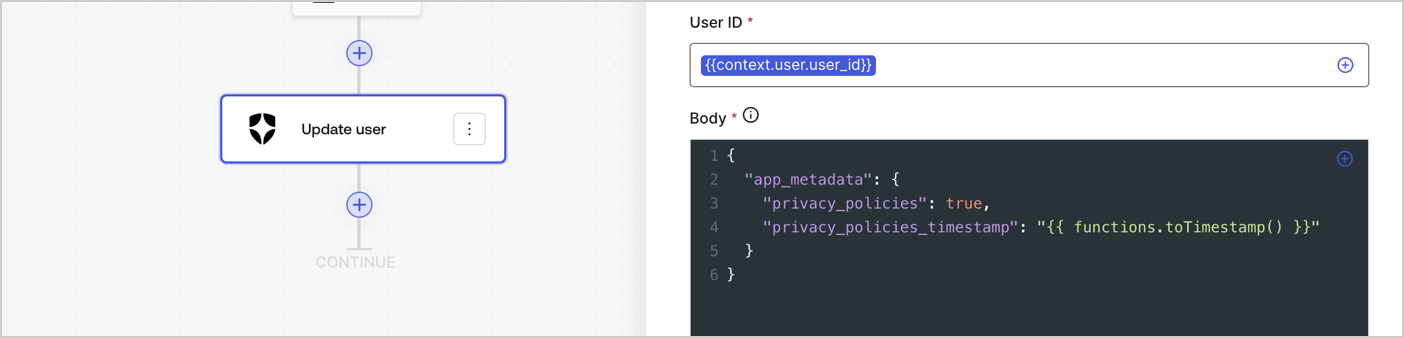
Add an Auth0 Update user action to the flow by following these steps:

1. Select the **Flow** **Update app\_metadata** > **Edit flow** to open the Flow editor in a new tab.
2. Below the StartAction, select the **+** icon to add an **Update user** action. Complete the fields below, then select **Save** to continue.

   * **Connection**: Select from the dropdown the Vault connection to your M2M application.

   * **User ID**: Enter `{{context.user.user_id}}`.

   * **Body**: Copy and paste the following code to update the app\_metadata with the privacy\_policies and privacy\_policies\_timestamp properties.

     ```text lines theme={null}
     {
       "app_metadata": {
         "privacy_policies": true,
         "privacy_policies_timestamp": "{{ functions.toTimestamp() }}"
       }
     }
     ```

   * Select **Save**.
3. Select **Publish** to save.
<Frame>
  <img src="https://mintcdn.com/docs-staging-ia-user-profiles/Ng0veijXu8wID0Bk/docs/images/cdy7uua7fh8z/CvMNIwWrOUwaFW4X3G28p/1fb70ae57a20749d9ffaaba8dc0b7e26/update-user-privacy.png?fit=max&auto=format&n=Ng0veijXu8wID0Bk&q=85&s=182ab61a99386f1f0be676e0f170ef6f" alt="Dashboard > Actions > Forms > User case privacy policy code" data-og-width="1404" width="1404" data-og-height="338" height="338" data-path="docs/images/cdy7uua7fh8z/CvMNIwWrOUwaFW4X3G28p/1fb70ae57a20749d9ffaaba8dc0b7e26/update-user-privacy.png" data-optimize="true" data-opv="3" srcset="https://mintcdn.com/docs-staging-ia-user-profiles/Ng0veijXu8wID0Bk/docs/images/cdy7uua7fh8z/CvMNIwWrOUwaFW4X3G28p/1fb70ae57a20749d9ffaaba8dc0b7e26/update-user-privacy.png?w=280&fit=max&auto=format&n=Ng0veijXu8wID0Bk&q=85&s=c74957bc255e4796da6e268209945ee4 280w, https://mintcdn.com/docs-staging-ia-user-profiles/Ng0veijXu8wID0Bk/docs/images/cdy7uua7fh8z/CvMNIwWrOUwaFW4X3G28p/1fb70ae57a20749d9ffaaba8dc0b7e26/update-user-privacy.png?w=560&fit=max&auto=format&n=Ng0veijXu8wID0Bk&q=85&s=f71476fc7b32213be1e9393ebb2f1290 560w, https://mintcdn.com/docs-staging-ia-user-profiles/Ng0veijXu8wID0Bk/docs/images/cdy7uua7fh8z/CvMNIwWrOUwaFW4X3G28p/1fb70ae57a20749d9ffaaba8dc0b7e26/update-user-privacy.png?w=840&fit=max&auto=format&n=Ng0veijXu8wID0Bk&q=85&s=bca01da3872e2e74a4009d60730d104c 840w, https://mintcdn.com/docs-staging-ia-user-profiles/Ng0veijXu8wID0Bk/docs/images/cdy7uua7fh8z/CvMNIwWrOUwaFW4X3G28p/1fb70ae57a20749d9ffaaba8dc0b7e26/update-user-privacy.png?w=1100&fit=max&auto=format&n=Ng0veijXu8wID0Bk&q=85&s=2f9d08ddd99b954fa5950c3cbf14262d 1100w, https://mintcdn.com/docs-staging-ia-user-profiles/Ng0veijXu8wID0Bk/docs/images/cdy7uua7fh8z/CvMNIwWrOUwaFW4X3G28p/1fb70ae57a20749d9ffaaba8dc0b7e26/update-user-privacy.png?w=1650&fit=max&auto=format&n=Ng0veijXu8wID0Bk&q=85&s=cd3403fee980a2a69459dc2fc7411031 1650w, https://mintcdn.com/docs-staging-ia-user-profiles/Ng0veijXu8wID0Bk/docs/images/cdy7uua7fh8z/CvMNIwWrOUwaFW4X3G28p/1fb70ae57a20749d9ffaaba8dc0b7e26/update-user-privacy.png?w=2500&fit=max&auto=format&n=Ng0veijXu8wID0Bk&q=85&s=d750228957e29048e580cf310f449e71 2500w" />
</Frame>

<Callout icon="file-lines" color="#0EA5E9" iconType="regular">
  The flow **Update app\_metadata** adds a `privacy_policies true` value to the app`_metadata` object and also generates a timestamp with a [helper function.](/docs/customize/forms/variables)
</Callout>

## Retrieve the form render code

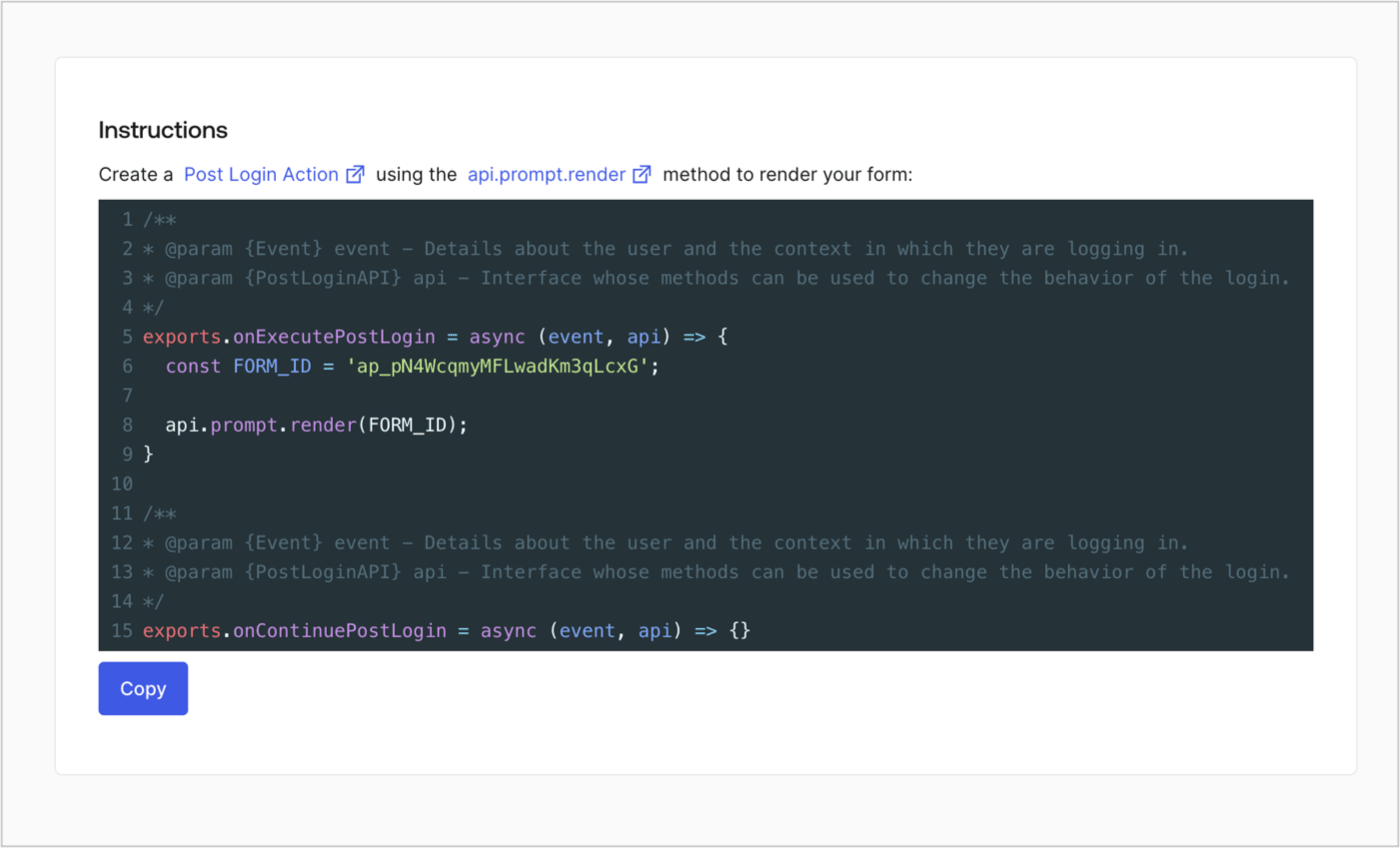
Retrieve your form render code to visually render the form with a custom Post Login Action by following these steps:

* From the Form editor, select **`<> Render`**.
* Select **Copy**.
<Frame>
  <img src="https://mintcdn.com/docs-staging-ia-user-profiles/GZcot1ht942eAFmB/docs/images/cdy7uua7fh8z/2EIUzc539sq9lwoTKbjoJv/496a864c0fc44a782c9cadca119dbfb0/embed.png?fit=max&auto=format&n=GZcot1ht942eAFmB&q=85&s=623af26fd367ca6ef9ec916dc56a636a" alt="Dashboard > Actions > Forms > Form > Embed" data-og-width="1400" width="1400" data-og-height="848" height="848" data-path="docs/images/cdy7uua7fh8z/2EIUzc539sq9lwoTKbjoJv/496a864c0fc44a782c9cadca119dbfb0/embed.png" data-optimize="true" data-opv="3" srcset="https://mintcdn.com/docs-staging-ia-user-profiles/GZcot1ht942eAFmB/docs/images/cdy7uua7fh8z/2EIUzc539sq9lwoTKbjoJv/496a864c0fc44a782c9cadca119dbfb0/embed.png?w=280&fit=max&auto=format&n=GZcot1ht942eAFmB&q=85&s=6584ba334564774225c793279b0ec0fe 280w, https://mintcdn.com/docs-staging-ia-user-profiles/GZcot1ht942eAFmB/docs/images/cdy7uua7fh8z/2EIUzc539sq9lwoTKbjoJv/496a864c0fc44a782c9cadca119dbfb0/embed.png?w=560&fit=max&auto=format&n=GZcot1ht942eAFmB&q=85&s=ecd4cab2b204b19b200e53c99a05e026 560w, https://mintcdn.com/docs-staging-ia-user-profiles/GZcot1ht942eAFmB/docs/images/cdy7uua7fh8z/2EIUzc539sq9lwoTKbjoJv/496a864c0fc44a782c9cadca119dbfb0/embed.png?w=840&fit=max&auto=format&n=GZcot1ht942eAFmB&q=85&s=f5d7cf394d118277781afc7000ccf1fc 840w, https://mintcdn.com/docs-staging-ia-user-profiles/GZcot1ht942eAFmB/docs/images/cdy7uua7fh8z/2EIUzc539sq9lwoTKbjoJv/496a864c0fc44a782c9cadca119dbfb0/embed.png?w=1100&fit=max&auto=format&n=GZcot1ht942eAFmB&q=85&s=af3afb6b8a9f3a359f3f9943f7129d6c 1100w, https://mintcdn.com/docs-staging-ia-user-profiles/GZcot1ht942eAFmB/docs/images/cdy7uua7fh8z/2EIUzc539sq9lwoTKbjoJv/496a864c0fc44a782c9cadca119dbfb0/embed.png?w=1650&fit=max&auto=format&n=GZcot1ht942eAFmB&q=85&s=b1fbf362e2e26cada59cd70e8b0549d6 1650w, https://mintcdn.com/docs-staging-ia-user-profiles/GZcot1ht942eAFmB/docs/images/cdy7uua7fh8z/2EIUzc539sq9lwoTKbjoJv/496a864c0fc44a782c9cadca119dbfb0/embed.png?w=2500&fit=max&auto=format&n=GZcot1ht942eAFmB&q=85&s=7db2ef4e0ff16e95c3a9b840b0da0a47 2500w" />
</Frame>

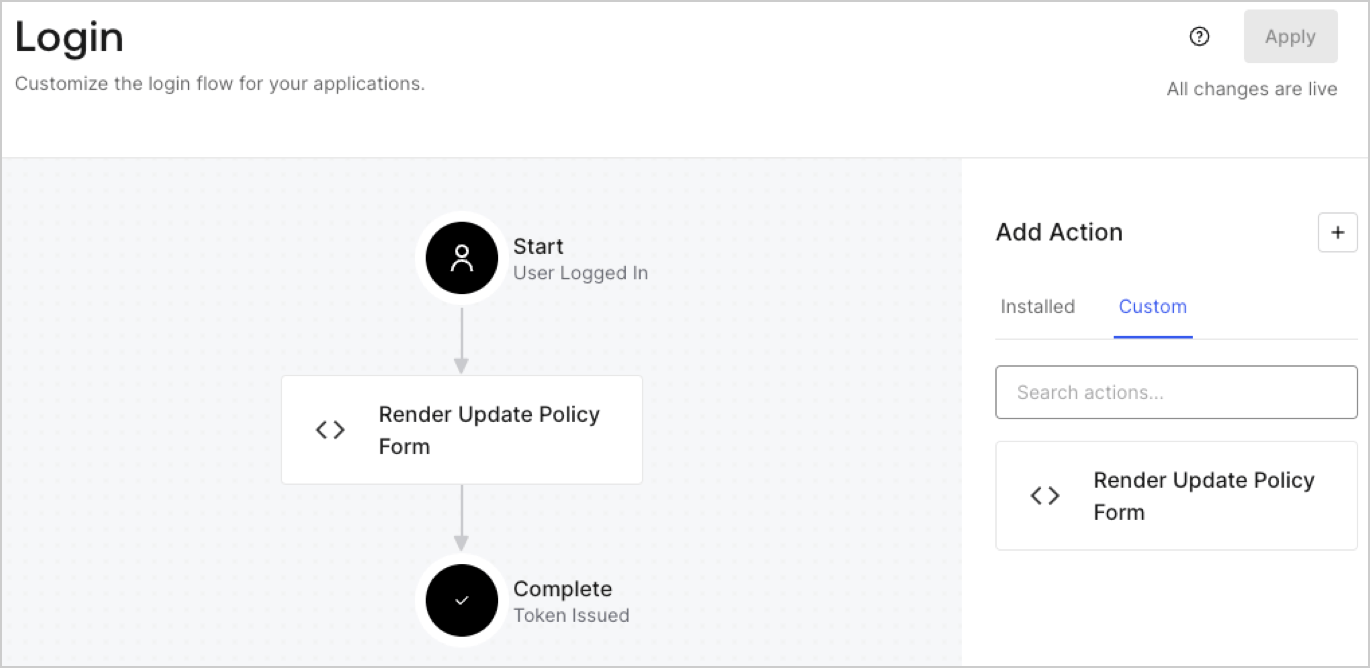
## Create a Post Login Action

Create a post-login Action to render your form by following these steps:

1. Navigate to **Auth0 Dashboard > Actions > Flows > Login.**
2. Select the **+** icon and Select **Build from scratch**:

   * **Name**: Enter `Render Update Policy Form`.
   * **Trigger**: Select `Login / Post Login`.
   * **Runtime**: Select the recommended version.
3. Select **Create**.

To configure the post-login Action:

1. Delete the existing code from the Code editor.
2. Paste the form render code into the Code editor.
3. Edit the code to define the conditional logic that will render the form.

   ```javascript lines theme={null}
   /**
   * @param {Event} event - Details about the user and the context in which they are logging in.
   * @param {PostLoginAPI} api - Interface whose methods can be used to change the behavior of the login.
   */
   exports.onExecutePostLogin = async (event, api) => {
     const FORM_ID = 'REPLACE_WITH_YOUR_FORM_ID';

     if (event.user.app_metadata.privacy_policies !== true) {
       api.prompt.render(FORM_ID);
     }
   }

   exports.onContinuePostLogin = async (event, api) => { }
   ```

   <Callout icon="file-lines" color="#0EA5E9" iconType="regular">
     The example code above will render the form when a user is missing the app metadata `privacy_policies` property.
   </Callout>
4. Select **Deploy.**
5. Drag and Drop the **Render Update Policy Form** Action to the **Login** flow.
   <Frame>
     <img src="https://mintcdn.com/docs-staging-ia-user-profiles/Q1Cduqid6z1WqjD8/docs/images/cdy7uua7fh8z/5TOwDgevZsBqd7yZynUYWU/41ca909dc3007aed4f40ff794a05efa5/postlogin.png?fit=max&auto=format&n=Q1Cduqid6z1WqjD8&q=85&s=f5ca401e8b5ee4dff067f2dc555bcddb" alt="Dashboard > Forms > Use Case > Render update policy form login action" data-og-width="1370" width="1370" data-og-height="668" height="668" data-path="docs/images/cdy7uua7fh8z/5TOwDgevZsBqd7yZynUYWU/41ca909dc3007aed4f40ff794a05efa5/postlogin.png" data-optimize="true" data-opv="3" srcset="https://mintcdn.com/docs-staging-ia-user-profiles/Q1Cduqid6z1WqjD8/docs/images/cdy7uua7fh8z/5TOwDgevZsBqd7yZynUYWU/41ca909dc3007aed4f40ff794a05efa5/postlogin.png?w=280&fit=max&auto=format&n=Q1Cduqid6z1WqjD8&q=85&s=ee4942c6a01aff7c25931b557dff6483 280w, https://mintcdn.com/docs-staging-ia-user-profiles/Q1Cduqid6z1WqjD8/docs/images/cdy7uua7fh8z/5TOwDgevZsBqd7yZynUYWU/41ca909dc3007aed4f40ff794a05efa5/postlogin.png?w=560&fit=max&auto=format&n=Q1Cduqid6z1WqjD8&q=85&s=137fbf5ad85f700bf07cf6f81caae44a 560w, https://mintcdn.com/docs-staging-ia-user-profiles/Q1Cduqid6z1WqjD8/docs/images/cdy7uua7fh8z/5TOwDgevZsBqd7yZynUYWU/41ca909dc3007aed4f40ff794a05efa5/postlogin.png?w=840&fit=max&auto=format&n=Q1Cduqid6z1WqjD8&q=85&s=479ed9f3979493e9214c093b4ffa60cd 840w, https://mintcdn.com/docs-staging-ia-user-profiles/Q1Cduqid6z1WqjD8/docs/images/cdy7uua7fh8z/5TOwDgevZsBqd7yZynUYWU/41ca909dc3007aed4f40ff794a05efa5/postlogin.png?w=1100&fit=max&auto=format&n=Q1Cduqid6z1WqjD8&q=85&s=d29aaee92afdb644b9ebe1b8b61919a6 1100w, https://mintcdn.com/docs-staging-ia-user-profiles/Q1Cduqid6z1WqjD8/docs/images/cdy7uua7fh8z/5TOwDgevZsBqd7yZynUYWU/41ca909dc3007aed4f40ff794a05efa5/postlogin.png?w=1650&fit=max&auto=format&n=Q1Cduqid6z1WqjD8&q=85&s=b63bee28a63415d2387f1ebe88f96742 1650w, https://mintcdn.com/docs-staging-ia-user-profiles/Q1Cduqid6z1WqjD8/docs/images/cdy7uua7fh8z/5TOwDgevZsBqd7yZynUYWU/41ca909dc3007aed4f40ff794a05efa5/postlogin.png?w=2500&fit=max&auto=format&n=Q1Cduqid6z1WqjD8&q=85&s=e32b5cd6fcf5e7c8c0c3f81475e76ece 2500w" />
   </Frame>
6. Select **Apply.**

### Test implementation

Test the implementation by following these steps:

1. Log in with an existing user whose app`_metadata` attribute `privacy_policies` does not have a value.
2. The post-login Action in the Login flow will render the form and prompt for acceptance.
3. Select **Auth0 Dashboard > User Management > Users,** locate the user and verify that the `app_metadata` attribute `privacy_policies` contains a `true` value and a timestamp.
